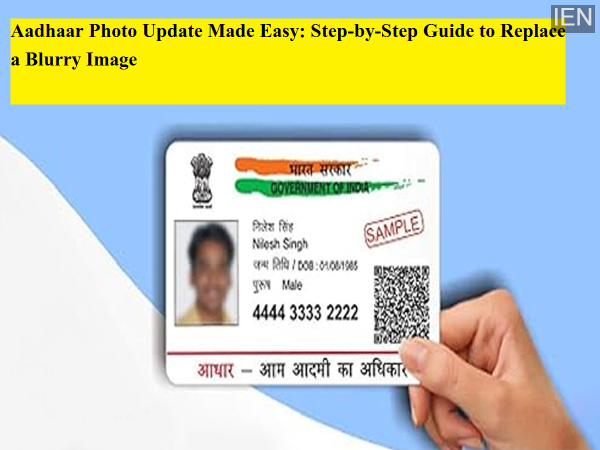
If your Aadhaar card photo looks unclear or outdated, you’re not alone. Blurry Aadhaar images often become the subject of online jokes, but in real life they can create serious problems during identity verification. Over time, facial features naturally change, and an old or unclear image may fail to match your current appearance.
The good news is that the Unique Identification Authority of India (UIDAI) allows residents to update their Aadhaar photograph through a simple and secure process. In this guide, we explain the easiest and correct way to change your Aadhaar photo without hassle.
Before starting the process, it is important to understand one key rule: Aadhaar photos cannot be updated completely online from home.
While UIDAI allows online updates for details such as name, address, and date of birth, biometric information—including photograph, fingerprints, and iris scan—must be updated in person at an Aadhaar Enrolment or Update Centre. This requirement exists for security and identity verification purposes.
However, you can book your appointment online, which helps save time and reduces waiting at the centre.
Follow these simple steps to replace your old or blurry Aadhaar image:
Go to the official UIDAI portal and navigate to the “My Aadhaar” section. From there, click on “Book an Appointment.”
Select your city and preferred Aadhaar Seva Kendra or enrolment centre. Enter your mobile number and log in using the OTP received on your phone.
Choose a convenient date and time slot.
Reach the selected Aadhaar centre at your scheduled time. At the centre, you will need to fill out an Aadhaar update/correction form.
An operator will verify your biometrics. Your new photograph will be captured live through a webcam, so there is no need to carry printed photos.
You must pay the prescribed fee for updating the photograph. Currently, the charge is ₹100 (inclusive of taxes).
After your photo is captured, you will receive an Acknowledgement Slip containing the Update Request Number (URN).
Using this URN, you can track the update status online. Typically, the Aadhaar photo update process may take 15 to 90 days to complete. Once updated, you can download the latest version of your Aadhaar card online.
Carry your original Aadhaar card when visiting the centre.
Since your photo will be taken live, dress neatly and be well-prepared to ensure a clear image.
Double-check your appointment details to avoid delays.
Keep the acknowledgement slip safe until the update is completed.
Updating your Aadhaar regularly is more than just improving your photo—it helps avoid identity mismatches during banking, SIM verification, government services, and travel. In today’s digital ecosystem, maintaining accurate documents reflects responsible digital hygiene.
Updating the photograph on your Aadhaar card is a straightforward process when done correctly. By booking an appointment online and visiting the nearest Aadhaar centre, you can quickly replace a blurry or outdated image. Taking this small step today can help you avoid verification issues in the future and keep your identity records accurate.