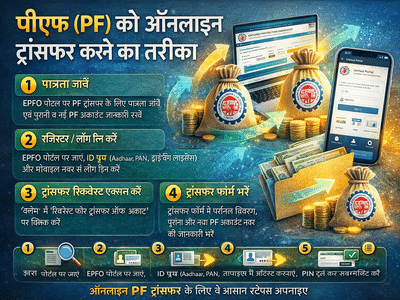
How to Transfer Your PF Online: Step-by-Step Guide to Move EPF Balance Easily
KalamTimes March 31, 2026 11:40 PM

Managing your Employees' Provident Fund Organisation account has become much easier with digital services. If you’ve recently changed jobs, transferring your Provident Fund (PF) balance to your new employer is essential to keep your savings consolidated and avoid complications later.

Here’s a complete, easy-to-follow guide on how to transfer your PF online.

Why PF Transfer Is Important

Whenever you switch jobs, a new PF account is created under your new employer. If you don’t transfer your old balance:

  • Your savings remain split across accounts
  • Interest calculations may get affected
  • Withdrawal or claim process becomes complicated

👉 Transferring PF ensures continuous savings growth and easy management.

Step 1: Check Eligibility for PF Transfer

Before initiating the transfer:

  • Visit the official Employees' Provident Fund Organisation portal
  • Verify if your PF account is eligible for transfer
  • Keep details ready:
    • Old and new PF account numbers
    • Employer details (region, office, establishment code)

👉 You can get these details from your company’s HR or accounts department.

Step 2: Register/Login on EPFO Portal

To proceed:

  • Create an account on the EPFO Member Portal
  • Use ID proof like:
    • Aadhaar
    • PAN
    • Driving License
  • Enter your mobile number and verify via OTP
  • 👉 This step ensures secure access to your PF account.

    Step 3: Access PF Transfer Request

    Once logged in:

    • Go to “Claim” section
    • Click on “Request for Transfer of Account”

    👉 This will open the PF transfer form.

    Step 4: Fill PF Transfer Form

    The form is divided into three sections:

    1. Personal Details
    • Name
    • Email ID
    • Bank account number
    • IFSC code
    2. Previous PF Account Details
    • Enter old PF account number
    • Use “Click here” option if you need help finding details
    3. Current PF Account Details
    • Enter new PF account number
    • Verify all information carefully
    Step 5: Employer Attestation

    You must choose one employer for verification:

    • Previous employer (recommended for faster processing)
    • Current employer

    👉 Attestation is mandatory to complete the transfer.

    Step 6: Verify and Submit
    • Click on Preview to check all details
    • Enter captcha code
    • Click on Get PIN
    • Enter OTP received on your phone
    • Click Submit

    🎉 Your PF transfer request is now successfully submitted!

    Step 7: Track PF Transfer Status

    After submission, you can:

    • Log in to the EPFO portal
    • Check claim status online
    • Track progress anytime
    Important Tips
    • Always double-check PF account numbers
    • Keep your Aadhaar linked for smoother processing
    • Choose the correct employer for faster approval
    Final Takeaway

    Online PF transfer through Employees' Provident Fund Organisation has made the process quick and hassle-free. By following the right steps, you can ensure your retirement savings remain organized and continue to grow without interruption.

    Switching jobs no longer means dealing with complicated paperwork—everything can now be done from the comfort of your home.

    © Copyright @2026 LIDEA. All Rights Reserved.