The budget TV space in India has become extremely crowded. Almost every brand today is offering 4K resolution, HDR support, and a smart interface at aggressive pricing. On paper, everything looks similar. In reality, the differences show up in panel quality, processing, and software smoothness.
That’s exactly where the Onida Fire TV tries to position itself differently. Instead of going with Android TV or Google TV, Onida has leaned into Amazon’s Fire TV ecosystem. That means a tighter integration with Alexa, a content-first UI, and a slightly different app experience compared to typical smart TVs.
In this article, we will spend time learning about both LED & QLED TVs from the Onida models with Fire OS, and look at how they perform in real-world usage. You will see different size variants in both panel types and have a detailed look at them. The idea is to help you make an informed decision and understand which version fits your space and viewing style without overcomplicating things.
LED vs QLED: Real-World Difference
Here’s the simplest way to look at these:
Both of these are display panel technologies. Where LED comes across as a straightforward 4K TV, it delivers the resolution that focuses on getting the basics right. You get good sharpness, reliable colours, and a smooth, smart experience that works very well in managing all your daily watching needs. It does exactly what most users expect without trying too hard.
On the other hand, QLED gives this shift that feels more display-focused, where the content starts to look more lively and immersive for the users. You will see that the colours are deeper, the brightness level is more vivid, and the overall visuals give extra richness.
It’s not an extreme jump, but it’s noticeable enough that you can get used to the vibrancy of QLED, but you might feel overwhelmed, and stick to LED for a viewing experience that is more enjoyable in day-to-day life.
Detailed Review of the Onida Fire TV LED & QLED Models
Onida 108 cm (43 inch) Ultra HD 4K Smart LED Fire TV
Display & Core Specifications
- Screen Size: 43-inch (108 cm)
- Resolution: 3840 × 2160 (4K Ultra HD)
- Panel Type: LED (VA panel, normally used in this range)
- Refresh Rate: 60Hz
- Viewing Angle: 178°
- 2GB RAM + 16GB Internal Storage
- True-Bezel-less design
- Eye Protect Mode for comfortable watching
It checks all the right boxes of a budget 4K TV from Onida. Practically, it gives sharp visuals that are enough when you are viewing the original 4K video. The 43-inch screen is definitely smaller, not very big, but good for small rooms. Size variants are also available for you to check out. While the text and finer details perform well, particularly on the OTT apps. Upscaling is average; it does not work aggressively to improve low-resolution pictures. Older content and HD channels are a bit soft, which is understandable at this price. Colour production is tuned to be balanced. It doesn’t oversaturate, which is good, but it also doesn’t pop. Skin tones look accurate, and overall vibrancy is excellent, especially for a typical entry-level LED panel.
Colour & Brightness Performance
- Brightness: 350 nits
- HDR10 & HLG with a 10-bit video stream of over 1 billion for maximum brightness
The colour correction is more towards natural than saturation. Because in here, the colours and the contrast are well-balanced because of HDR10 & HLG. For an indoor set-up or a standard living room, the brightness is perfect, but in well-lit rooms, in particular, when it is daytime, some reflection is easily visible. This is not a downside but a parallel that can be drawn to LED panels that are meant to be this reflective, which is why QLED exists.
Contrast & Black Levels
Due to the VA panel, contrast levels are quite impressive for this price range. Blacks appear reasonably deep, and there’s a good sense of depth in darker scenes. This helps movies and web series feel more engaging, especially when viewed head-on. The panel maintains uniformity well, and the overall picture depth feels balanced and pleasing for everyday viewing.
Audio Performance
- Speaker Out: 20W (2 x 10W) speakers
- Sound Support: Dolby Sound
The 20 W power is sufficient in a small living room or bedroom. Clarity of dialogue and music is also good, particularly in shows and news. Nevertheless, it has little bass and depth. So, in the case of movies or anything cinematic, this one would not impress the connoisseur of excellent audio. But this can be improved by supporting it through soundbars and external speakers. Then, it is more than enough for a standard home.
Fire TV OS & Performance
- Operating System: Fire TV OS
- RAM & Storage: 2GB RAM / 16GB storage
- Voice Control: Alexa Voice Remote
It is the operating system of this TV that stands out excellently. The interface is very clean, user-friendly, and designed for easy content navigation. Unlike Google & other Android TVs, it is less complicated and supports voice commands better. You can easily access your favourite app, even if you are a first-time user or an elderly person. The refresh rate and responsiveness are also quick and run without any lag.
Alexa voice control adds an extra layer of convenience. Whether you want to search for a movie, open an app, or control playback, it works reliably and saves time.
Connectivity & Ports
- HDMI Ports: 3 (including ARC support)
- USB Ports: 2
- Wi-Fi: Dual-band support
- Bluetooth: Yes
Connectivity is well-covered in this system. A set-top box, gaming console, and soundbar can be easily connected with all the ports that are available. It also supports dual-band Wi-Fi, along with bluetooth and contemporary connectivity features like screen mirroring.
Gaming Features & Motion Handling
- Refresh Rate: 60Hz
- Motion Technology: MEMC (Motion Estimation & Motion Compensation)
- Input Lag: Low (optimised for casual gaming)
- Gaming Support: Console-ready (PS5, Xbox, casual PC gaming)
Onida Fire TV is geared to be the perfect system for casual gaming. Most console games at 30-60 FPS can run on the 60Hz panel, maintaining smooth and stable gameplay. Motion is also enhanced with MEMC support, which minimises blur and gives the fast scenes a more flowing appearance, particularly in sports and action games. The response to input is quick enough to support day-to-day gaming and, therefore, will not have controls feel sluggish during normal gameplay.
Final Verdict
If you need a basic, trustworthy 4K smart TV with Fire TV integrated into it and with which you are able to comfortably watch it daily. Then, this is the perfect buy for you. It might not be the most feature-laden or eye-catching of its kind on the market, yet it also comes with the basics down the line, which is what makes it one of the safest and most reasonable options to make in most households.
Also available in another screen size:
Onida 139 cm (55 inches) Ultra HD 4K Smart LED Fire TV
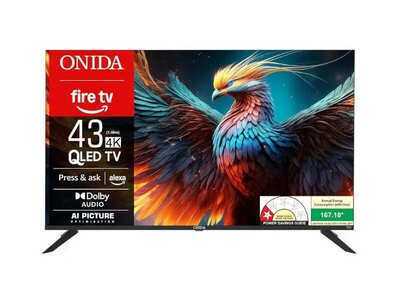
Onida 108 cm (43 inch) QLED Ultra HD 4K Smart Fire TV
This model is a jump from LED to QLED on the Onida Fire TV. It is backed by actual Quantum Dot technology, which is designed for colour accuracy and brightness levels. This tells us that there is a wider range of colours. You will witness richer red, deeper blues, and more balanced tones. The contrast that you draw from the standard panel is that the visuals don’t look flat. The QLED panel adds a layer of depth that makes the content even more engaging. Brightness also sees a measurable boost. With 350 nits, the highlights look defined, and the screen looks visible in even a well-lit room.
Contrast & Dynamic Range
The QLED panels of Onida are made to go beyond higher contrast; even if the value remains the same, the screen makes it look more surreal. Because of the Quantum Dot technology and Onida contrast, the separation of light and dark colours is quite visible. It makes the picture look deeper, as the blacks are more vivid and the brighter areas are more visible.
HDR Improvement
The QLED version is more impactful with HDR10 and Dolby Vision, which has multiplied and enhanced the picture quality. Dolby Vision operates one frame at a time in order to maximise brightness as much as it can. Rather than a flat HDR effect, you have more dynamic highlights and better detail in both bright and dark scenes. In conjunction with the increased brightness of the QLED panel, HDR content actually is more intense here. The contrast is apparent, whether it is sunlight in the outdoor shots or a reflection in the darker frames, and it provides a more cinematic experience to the content.
Audio Enhancements
QLED models also introduce superior sound support in Dolby Atmos and Dolby Audio with a 20W speaker setup. Although the hardware output is not different compared to the LED version, the processing is different. Dolby Atmos introduces space and layers to sound and makes the audio experience not as flat but more immersive.
Same Program, More High-End Experience
Although the experience of the Fire TV OS does not differ, the upgraded quality of the panels alters the appearance of all things. The App interfaces, thumbnails, and streaming content all look more vivid and clearer. The 4K resolution, QLED colour improvement and HDR support make the entire experience more refined and in a premium TV category.
Final Verdict
Once you add to this Quantum Dot technology, the upgrade begins to make sense. The LED type works well in daily use, as the QLED one introduces an additional layer of richness, brightness, and depth to the colour that makes content more engaging in the long run. Assuming you already own a 4K TV, the upgrade is not quite a luxury but a more sensible long-term decision, particularly when you are interested in the way the content actually appears and not the way it is written on paper.
Also available in another screen size:
Onida 139 cm (55 inches) QLED Ultra HD 4K Smart Fire TV
Which One Should You Choose?
The decision of choosing between the LED and QLED models is actually a question of what you anticipate from your viewing experience and the level of priority you place on picture quality.
- The LED model fits in well, provided your usage is largely casual, such as watching daily television shows, news, YouTube or infrequent OTT. It provides a steady 4K resolution, balanced colours and a non-complicated Fire TV experience. It is the type of TV that performs its duty and keeps on working consistently for everyday use.
- The QLED model, however, is more suited in the case that one is more active and consistent in their content consumption. When watching a high number of movies, web series, or quality OTT, the difference in brightness, colour richness, and contrast will be more evident as time passes. Pictures are more vibrant, and the overall experience is a little more luxurious.
- Thus, in case you are focused on value and simplicity, LED is a good choice. However, in case you can afford to pay a bit extra to get more visuals and a more engaging experience, the better option will be QLED.