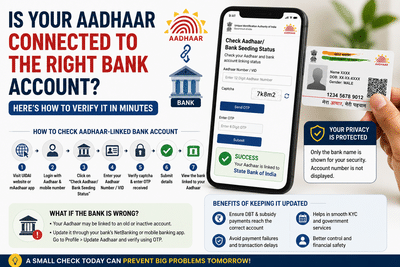
In today's digital ecosystem, Aadhaar serves as a key identity document that connects citizens to banking services, government welfare programs, subsidies, tax-related services, and financial transactions. However, many people are unaware of which bank account is currently mapped to their Aadhaar number, especially if they have changed banks or opened multiple accounts over the years.
This lack of awareness can sometimes lead to confusion when government benefits, LPG subsidies, pension payments, or Direct Benefit Transfer (DBT) funds are credited to an unexpected account. Fortunately, Aadhaar holders can quickly verify their bank mapping status online and ensure that benefits are being routed correctly.
Why Checking Aadhaar-Bank Mapping Has Become ImportantOver the years, individuals often open salary accounts, savings accounts, joint accounts, or switch banks for better services. As a result, Aadhaar may remain linked to an older account even after a person starts actively using a different bank.
Since several government schemes rely on Aadhaar-based payment systems, it is essential to know which bank is currently registered against your Aadhaar number. If the mapping is incorrect or outdated, subsidy payments and welfare benefits may not reach the account you regularly use.
Regular verification can help prevent payment-related issues and ensure seamless access to government benefits.
What Information Can You Check?The Aadhaar verification system allows users to identify the financial institution currently linked to their Aadhaar number.
For security and privacy reasons, the system does not reveal the complete bank account number. Instead, it only displays the name of the bank where Aadhaar seeding is active.
This helps users confirm whether their Aadhaar is linked to the correct bank without exposing sensitive account information.
Simple Process to Verify Aadhaar-Linked Bank DetailsIndividuals can check their Aadhaar-bank linking status through Aadhaar services available online.
Step 1: Access Aadhaar ServicesOpen the Aadhaar services portal or use the official Aadhaar mobile application.
Step 2: Authenticate YourselfSign in using your Aadhaar credentials and ensure your registered mobile number is active for OTP verification.
Step 3: Select Bank Mapping StatusLocate the option that allows users to verify Aadhaar seeding or bank linkage status.
Step 4: Enter Aadhaar InformationProvide your 12-digit Aadhaar number or an alternative Virtual ID (VID).
Step 5: Complete Security VerificationEnter the captcha code displayed on the screen and request an OTP.
Step 6: Verify OTPSubmit the one-time password received on your Aadhaar-linked mobile number.
Step 7: View Bank InformationAfter successful verification, the system will display the name of the bank currently associated with your Aadhaar number.
The service does not disclose account numbers, branch information, or transaction details.
What If an Old Bank Is Still Linked?Many users discover that Aadhaar remains connected to a bank account they no longer actively use. This situation commonly occurs when a salary account was opened years ago or when banking relationships changed over time.
If the displayed bank is not your preferred account for receiving benefits and payments, it is advisable to update the Aadhaar-bank mapping as soon as possible.
Failing to do so could result in government subsidies or benefit transfers being credited to an account that is rarely monitored.
How to Update Aadhaar Seeding with a New Bank AccountMost banks now provide digital facilities that allow customers to update Aadhaar linkage without visiting a branch.
Users can generally complete the process through:
After verification, the bank will update its records and initiate Aadhaar mapping procedures.
Benefits of Keeping Aadhaar Linked to the Correct AccountMaintaining accurate Aadhaar-bank linkage offers several advantages:
Before checking your Aadhaar-bank mapping status, ensure:
As digital governance and Aadhaar-based payment systems continue to expand across India, verifying your Aadhaar-linked bank account has become a necessary financial check. A quick verification can help ensure that subsidies, pension payments, and government benefits reach the intended account without interruption.
If you have changed banks recently or manage multiple accounts, taking a few minutes to verify your Aadhaar-bank mapping today can save you from future payment-related complications and ensure smoother access to essential services.