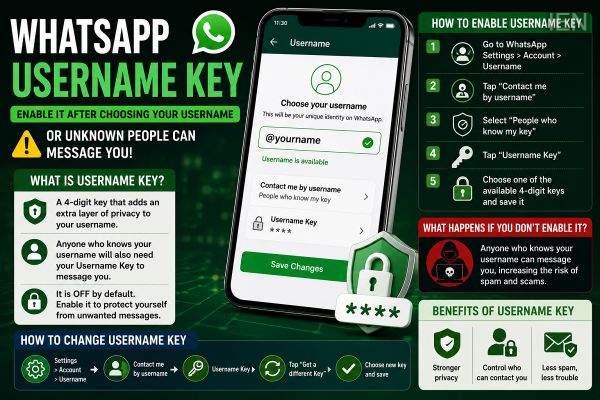
WhatsApp has begun rolling out its new Username reservation feature, allowing users to claim a unique identity before the feature becomes fully available later this year. However, privacy experts suggest that reserving a username is only the first step. Users should also enable the Username Key feature to add an extra layer of protection against unwanted messages and potential spam.
The Username Key is designed to make it more difficult for unknown people to contact you, even if they already know your WhatsApp username.
Username Key is an additional privacy feature linked to your WhatsApp username.
Instead of allowing anyone who knows your username to start a conversation, WhatsApp lets you require a unique four-digit Username Key before someone can contact you for the first time.
This creates an additional verification layer and gives users greater control over who can reach them.
The feature is currently turned off by default, meaning users must enable it manually if they want the extra protection.
If Username Key remains disabled, anyone who knows your WhatsApp username may be able to send you messages once the username system becomes fully operational.
By enabling Username Key:
Unknown users cannot contact you using only your username.
A valid Username Key is also required for first-time conversations.
Spam messages and unwanted contact requests can be reduced.
Your privacy remains stronger even after sharing your username.
This makes the feature especially useful for users who plan to share their username publicly.
Before enabling Username Key, you must first reserve your WhatsApp username.
Once your username is set, follow these steps:
Open WhatsApp.
Go to Settings.
Tap Account.
Select Username.
Open Contact me by username.
Choose People who know my key.
Tap Username Key.
Save one of the available keys suggested by WhatsApp.
After saving the key, only people who have both your username and Username Key will be able to initiate a new conversation.
No.
Unlike a PIN or password, WhatsApp does not currently allow users to create a custom Username Key.
Instead, the app automatically generates several available keys, and users can select one from the provided options.
This approach helps maintain consistency and reduce the possibility of predictable security codes.
Yes.
Users can generate a new Username Key whenever they want.
To change it:
Open WhatsApp Settings.
Go to Account.
Tap Username.
Select Contact me by username.
Open Username Key.
Tap Get a Different Key.
Choose the newly generated key and save it.
Changing your key periodically can provide an additional level of privacy.
Although users may not notice any immediate changes, the feature will become important once WhatsApp fully launches username-based messaging.
With Username Key enabled:
Only people who know both your username and your Username Key can start a new conversation.
Random users cannot message you simply because they discovered your username.
The likelihood of spam messages, unsolicited chats, and impersonation attempts may be reduced.
Existing contacts who already have your phone number saved will continue to communicate normally.
The Username Key feature reflects WhatsApp's broader effort to improve user privacy as it moves beyond phone number-based communication. While usernames make it easier to keep mobile numbers private, Username Key adds another level of access control by limiting who can initiate contact.
Users planning to reserve a WhatsApp username are advised to enable Username Key as well, ensuring that their account remains better protected from unwanted messages while maintaining greater control over their digital identity.