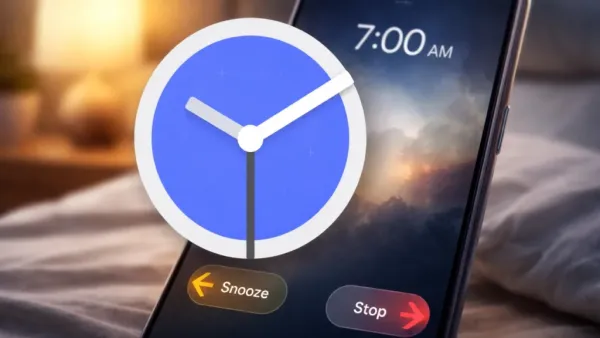
The tech giant, Google, has started to implement a remarkable change to its Android Google Clock application that alters the process of silent alarms, offers more options for the users, and less accidentally traps the change. It will be welcomed by many who have difficulty with their morning alarms and are prone to putting them off unintentionally.
The Google Clock app’s version 8.5 has been spread out already, which is bringing back and elaborating the long-requested move-to-kill gesture for alarms. Instead of only hitting the large “Snooze” or “Stop” buttons, the users are given the option to swipe left or right to turn off the alarms, an action that is somewhat more deliberate than a quick tap.
This change is incorporated into a new setting feature called “Dismiss alarm with a,” where the user can select either to stop alarms using the old Tap method or Swipe gestures.
In case Swipe is chosen, the UI displays both Snooze (on the left) and Stop (on the right), and each one is activated with a different swipe motion as the alarm rings.
The swipe option is a little friction of protection compared to the tap-only dismissal, which shows huge pill-shaped buttons that might even cause accidental pressing during the waking-up process.
The accidental silencing of alarms has been a major problem for many Android users since changes in the latest versions of the Clock app made it easier to accidentally select the wrong control in a sleepy state, leading to oversleeping or missed events.
The new design swapped the more deliberate swipe mechanism for large clickable buttons, thus allowing for easy tapping of the wrong control in a groggy state, which resulted in oversleeping or missed events.
Tech observers, including forums and Reddit threads, have been talking about the user dissatisfaction with the older tap-only method, with some users reporting numerous accidental cancellations and asking for a slower way of interacting with alarms.
By allowing swipe gestures back into the system and giving users the opportunity to choose their preferred input style, Google is enabling various users to adopt the method that best fits their habits. Users who like fast tap buttons can keep them; those who want to avoid mistaken dismissals can switch to swipe.
After installing Google Clock version 8.5, users will possibly see a short demonstration of how to interact with the new alarm features, particularly the control for swiping or tapping to dismiss an active alarm.
The Clock application’s Settings > Alarms section has a new setting called “Dismiss alarm with a,” where users will be able to pick:
When the user opts for the swipe action, the dismissal container animations indicate the Snooze (left) and Stop (right) directions, thus guiding the user to do the right interaction with the active alarm.
Although the Clock application has not experienced significant feature enhancements in the past. This update aligns with Google’s broader push toward intentional interactions of Google’s Material 3 Expressive visual redesigns with every UI element in Android, including alarm interactions, which has been the main factor that brought alarm interactions to their evolution.
Moreover, the return of the swipe control is in accordance with the pattern in both Android and iOS platforms of moving toward the so-called intentional gestures that minimize the possibility of triggering undesired actions. Apple, for instance, has separately and independently turned towards slide-to-stop alarm gestures in recent iOS updates to avoid accidental dismissals.

The swipe-to-dismiss feature is included in the latest version of Google Clock 8.5, which will be available gradually through the Google Play Store and server-side activation. Not all devices will be able to access the new feature right away since availability usually depends on the model and region, but there have been reports that the control is already appearing on the latest Pixel devices, and it will be gradually rolled out to more devices.
Increasingly, the option will be available to those users who constantly depend upon alarms for various purposes, such as waking up, exercising, attending meetings, and getting reminders. However, they will be able to do it in a much safer and more deliberate manner.