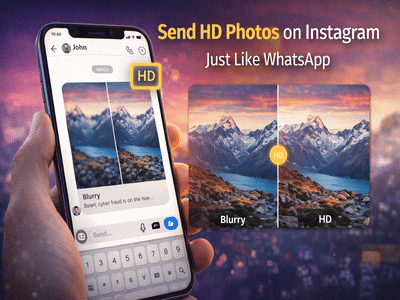
In a major upgrade for users, Instagram has introduced a feature that allows you to send photos in high definition (HD), similar to what users already enjoy on WhatsApp. This update solves one of the most common problems faced by users—loss of image quality while sharing photos.
Until now, many users relied on WhatsApp or sent images as documents to maintain quality. But with this new feature, Instagram users can now send sharp, clear images directly through chats without any workaround.
Why This Feature MattersEarlier, whenever photos were shared via Instagram Direct Messages (DMs), the platform compressed them heavily. This often resulted in blurry or low-quality images, especially noticeable in detailed photos.
With the new HD option, users can now:
This update makes Instagram a more complete messaging platform, reducing the need to rely on other apps for high-quality sharing.
How to Send HD Photos on InstagramSending HD photos on Instagram is simple and takes just a few steps:
Step 1: Open InstagramLaunch the Instagram app on your smartphone.
Step 2: Go to DMsTap on the Direct Messages (DM) section.
Step 3: Select ChatOpen the conversation where you want to send the photo.
Step 4: Choose PhotoTap on the attachment icon and select a photo from your gallery.
Step 5: Enable HD OptionBefore sending, look for the “HD” option at the top corner and tap on it.
Step 6: Send PhotoNow tap the send button. The image will be delivered in high quality without compression loss.
No Need to Share Your Phone NumberOne of the biggest advantages of this feature is privacy. Earlier, if someone wanted high-quality images, they often had to switch to WhatsApp, which required sharing phone numbers.
Now, with Instagram’s HD photo feature:
The HD feature on Instagram works similarly to WhatsApp’s option:
However, Instagram’s integration makes it more convenient for users who prefer social media messaging over traditional chat apps.
Who Will Benefit the Most?This feature is especially useful for:
It ensures that the receiver gets the image exactly as intended.
Final TakeawayWith the introduction of HD photo sharing, Instagram is closing the gap with messaging apps like WhatsApp. Users can now enjoy better image quality, improved convenience, and enhanced privacy—all within a single platform.
If you haven’t tried it yet, update your app and start sharing photos in HD today.
Disclaimer: Feature availability may vary depending on app version and region.