Google has now begun rolling out its Gemini app for Mac users. Until now, most people accessed Gemini via a web browser; however, the arrival of a dedicated desktop app has made accessing this AI assistant even more convenient. Users no longer need to open a new browser tab every time; instead, they can launch Gemini directly on their screen to continue their work seamlessly.
The standout feature of this new Mac app is its quick-access capability. Users can instantly launch Gemini simply by pressing the keyboard shortcut Option + Space. This brings up a small floating window on the screen, allowing you to directly ask the AI questions or seek assistance. This feature is particularly useful for those who require quick access to information while working.
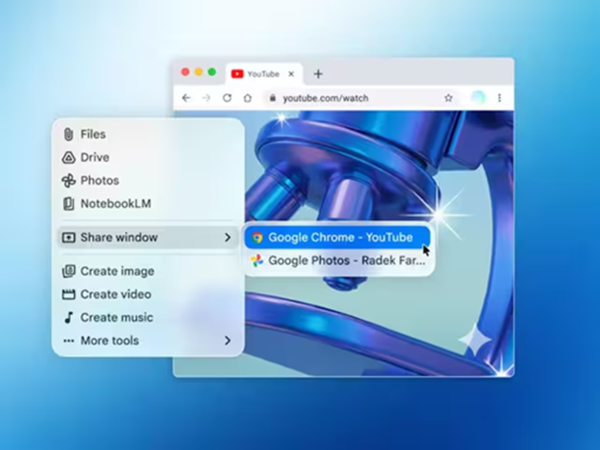
The Gemini Mac app also includes a screen-sharing feature. Once permission is granted, Gemini can view the content of your current window and provide responses based on that context. For instance, if you are editing a document or reading an article on a website, you can receive immediate assistance without having to switch tabs.
Additionally, the app offers a file upload feature. Users can upload documents, photos, or other files from their local system or Google Drive and have Gemini process them—whether it involves drafting text, generating images, or providing general media-related assistance. The user experience is largely consistent with that of the mobile and web versions.
In terms of strategy, Google is positioning Gemini not merely as a web-based tool, but as a robust desktop AI assistant. Given that desktop apps for other AI tools—such as ChatGPT and Claude—already exist, this move was considered a crucial and necessary step.
While Gemini currently cannot execute complex system-level actions directly, it focuses on providing quick and effortless assistance based on the information visible on the screen. This remains its greatest strength.
How to Use It?
The app is completely free and is compatible with macOS Sequoia (version 15 or higher). Users can download it directly from the official Gemini website. After installing, you simply need to log in with your Google account, and then you can start using it immediately.
Disclaimer: This content has been sourced and edited from News18 Hindi. While we have made modifications for clarity and presentation, the original content belongs to its respective authors and website. We do not claim ownership of the content.